
What you'll need
- Paprika Recipe Manager 3 on any of your devices.
- Brasa on your iPhone or iPad.
- About five minutes.
Step 1
Export your library from Paprika
In Paprika, export your recipes in Paprika Recipe Format — on Mac
it's under File → Export; on iPhone and iPad it's in Paprika's
settings under export. You'll get a single .paprikarecipes file
containing every recipe and its photos.
Step 2
Get the file onto the device running Brasa
Save it to Files (iCloud Drive works well), or AirDrop it from your Mac to your iPhone. Any location the Files app can see is fine.
Step 3
Import into Brasa
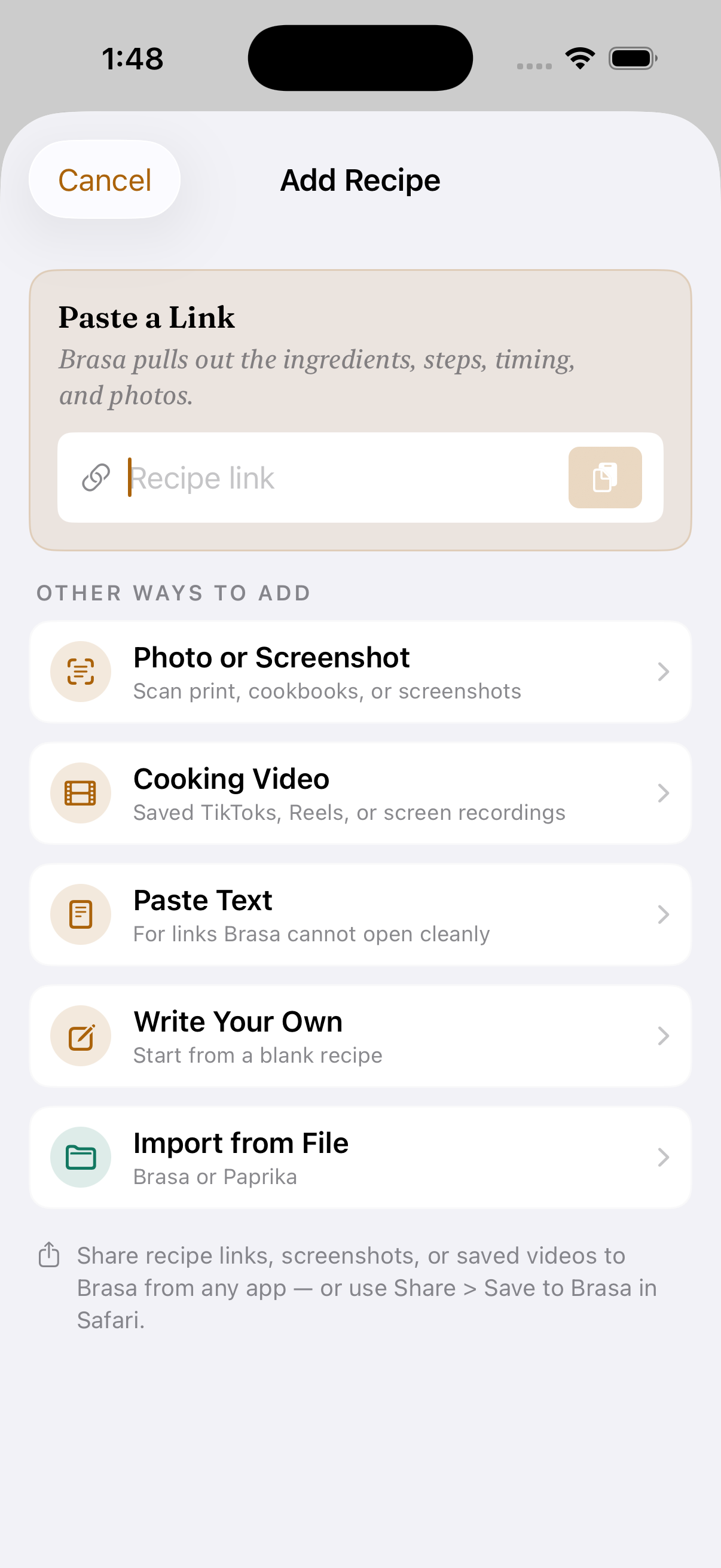
In Brasa, tap Add Recipe, choose Import from File,
then pick your .paprikarecipes file. Brasa unpacks everything on your
device — a few hundred recipes take under a minute, photos included.
What comes across
- Recipes — titles, ingredients, directions, notes, servings, and times.
- Photos — hero images travel with each recipe.
- Source links — the original web address stays attached, so credit and context are never lost.
- Categories — Brasa reads your Paprika categories and maps them to meal type, cuisine, and difficulty tags where they match, so your library stays browsable from day one.
Meal plans, pantry contents, and grocery lists don't transfer today — the import focuses on the part that took you years to build: the recipes themselves.
What happens after the import
Imported recipes behave like recipes captured in Brasa. Open one and you get an ingredient-aware cook mode you can talk to — say “next” or “how much butter” and Brasa Voice answers out loud — plus automatic timers spotted in the steps, scaling with real fractions, and AI-estimated nutrition with Brasa Plus. Drop them onto the weekly planner and Brasa builds one aisle-sorted shopping list across everything you've planned.
And because Brasa's sync is end-to-end encrypted with no account to create, your imported library appears on your iPhone, iPad, and Mac without ever being readable by anyone but you.
Frequently asked questions
Is the import free?
Paprika import is part of Brasa Plus, which starts with a 7-day free trial — plenty of time to migrate your whole library and cook from it. And imported recipes are never held hostage: viewing, cooking, and exporting your recipes stay free forever, whether or not you keep Plus.
Does importing change anything in Paprika?
No. The export is a copy. Paprika keeps working exactly as before, so you can run both apps side by side while you settle in.
How big a library can I import?
There's no practical ceiling — Brasa Plus has an unlimited library, and the import runs without any cloud AI processing, so there's no per-recipe cost or wait.
Does the import bring my photos and notes?
Yes. Brasa imports recipe titles, ingredients, directions, notes, photos, source links, and times from a Paprika Recipe Format export. Your Paprika categories are read too, and mapped to Brasa's meal type, cuisine, and difficulty tags where they match.
How long does the import take?
A few hundred recipes typically import in under a minute, photos included. The import runs without any cloud AI processing, so there's no per-recipe wait.
What if some recipes come in oddly?
Every imported recipe is fully editable. If a decade-old entry had unusual formatting, open it, tidy it, and Brasa re-runs its step and timer detection on save.
Bring your cookbook with you
Brasa is on the App Store. Founder lifetime $59.99 is available for the launch window only.
Free to download · iPhone, iPad & Mac